How to store many values of the same type under one name: indices, reading and writing individual cells, and traversing an array with a loop.
Introduction
Suppose we want to store the scores of five students: 12,18,15,9,20
We could create five different variables, but this becomes uncomfortable when the number of values grows. If there are 100 scores, creating 100 separate variables is not a good solution.
An array lets us store many values under one name. The values are placed next to each other in separate cells.
For example, an array named a may look like this:
a=[12,18,15,9,20]
The array has one name, a, but it contains five values. Each value is stored in its own cell.
Arrays are useful whenever we work with a sequence of similar values, such as scores, ages, prices, temperatures, or numbers from the input.
Structure of an array
An array can be imagined as a row of boxes. Every box stores one value.
Consider this array: a=[12,18,15,9,20]
It contains five cells:
the first cell stores 12;
the second cell stores 18;
the third cell stores 15;
the fourth cell stores 9;
the fifth cell stores 20.
The number of cells is called the size of the array. The size of this array is 5.
In C++, all cells of one array store values of the same type. For example, an integer array stores integers.
This creates an array named a with space for five integers. At this moment, we have only created the cells. We have not yet placed useful values inside them.
We can also create the array and immediately give values to all cells:
Now the five cells contain the five given values.
Indices
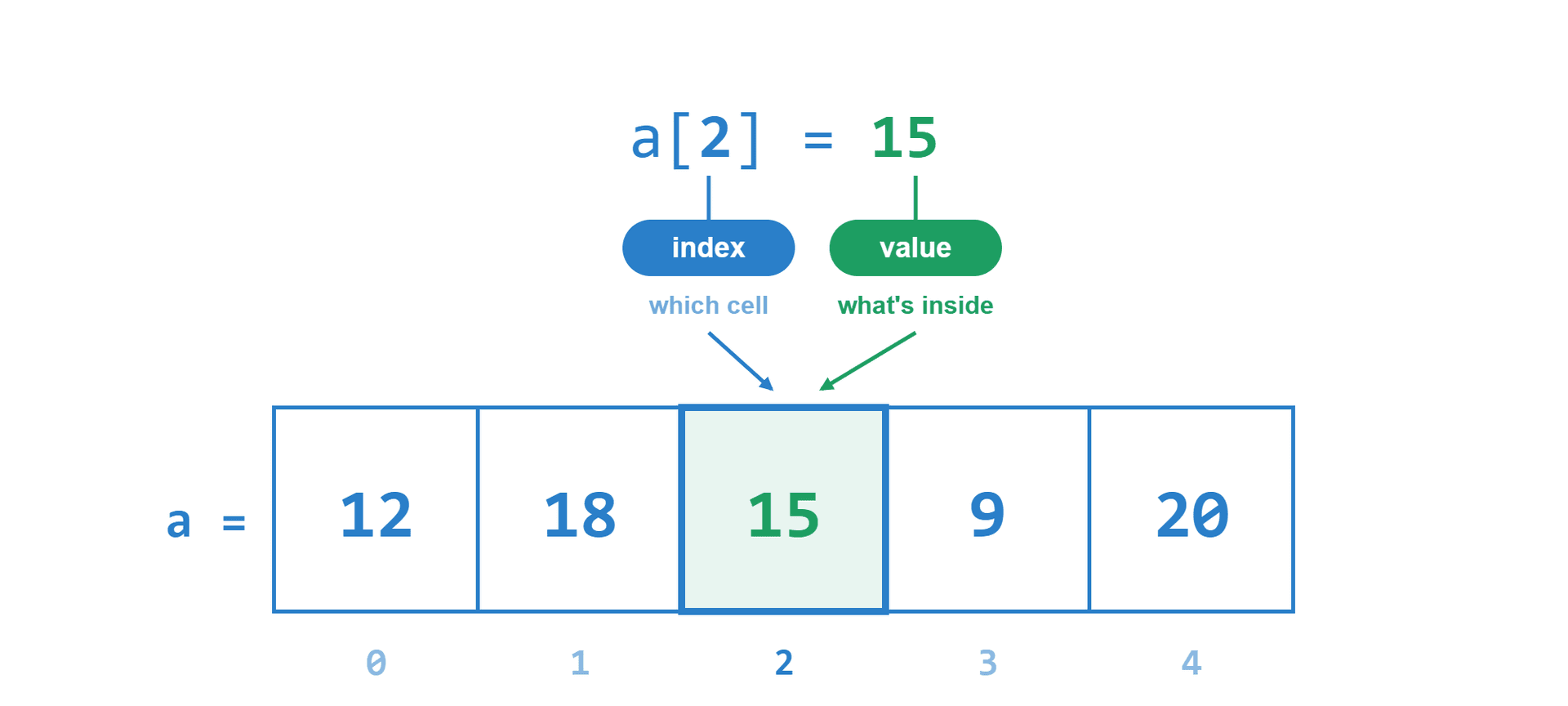
To use one particular cell, the program needs to know exactly which cell we mean. For this reason, every cell has a number called an index. In C++, the index of the first cell is 0.
For an array with five cells, the indices are: 0,1,2,3,4
The values and indices of our array are:
Index
0
1
2
3
4
Value
12
18
15
9
20
The value 12 is stored at index 0. The value 15 is stored at index 2. The value 20 is stored at index 4.
We write the name of the array and the index inside square brackets:
a[0] means the value in the cell with index 0;
a[2] means the value in the cell with index 2;
a[4] means the value in the cell with index 4.
For this array:
a[0]=12
a[2]=15
a[4]=20
The index and the value are different things. In a[2]=15, the number 2 tells us which cell to open, while 15 is the value stored inside that cell.
Valid indices
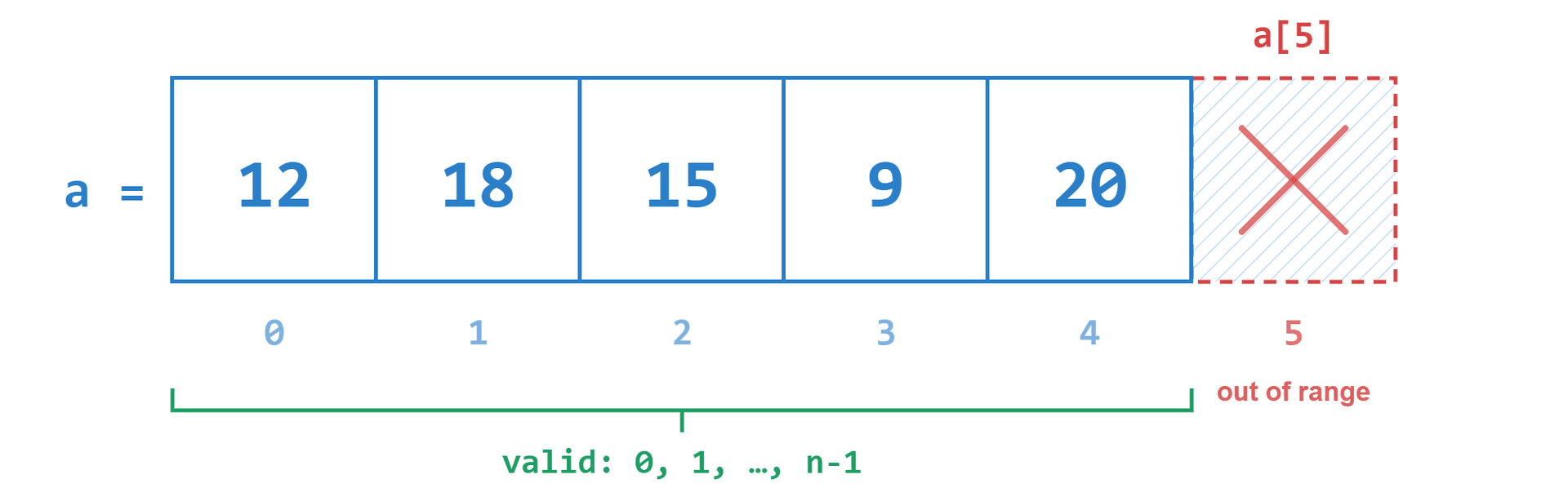
If an array has size 5, its valid indices are from 0 to 4.
More generally, if an array has size n, its valid indices are from 0 to n−1:
The first element is always at index 0: a[0].
The last element is always at index n−1: a[n−1].
The index n is already outside the array. In an array of size 5, accessing a[5] is an out-of-bounds error.
Getting a value from an array
We can print one value by writing its index:
For a=[12,18,15,9,20], the expression a[2] gives the value 15. Therefore, the program prints:
We can also store the index in a variable:
Because i=3, the expression a[i] means a[3]. The value at index 3 is 9, so the program prints 9.
This is one of the main strengths of an array: when we know the index, we can directly read or modify the value stored in that cell in O(1) constant time.
Reading one array cell
C++
source · C++line 1
1int a[5] = {12, 18, 15, 9, 20};
2int i = 2;
3cout << a[i] << endl;
Create the array
L1
The array has five cells with indices from 0 to 4.
array a5 cells
five cells
12
18
15
9
20
0
1
2
3
4
inot chosenvalueunknown
L1
1 / 3
Changing a value
A value inside an array can be replaced.
Start with: a=[12,18,15,9,20]
Now execute:
The cell with index 2 changes from 15 to 17:
a=[12,18,17,9,20]
Only one cell changes. All other cells stay the same.
We can also use the old value when calculating the new value:
Before this line, a[3]=9. We add 5, so the new value becomes 14.
The array changes from a=[12,18,17,9,20] to a=[12,18,17,14,20].
A shorter way to write the same operation is:
Changing array values
C++
source · C++line 1
1int a[5] = {12, 18, 15, 9, 20};
2a[2] = 17;
3a[3] += 5;
Start with five values
L1
Each value is stored in its own numbered cell.
array a5 cells
array a
12
18
15
9
20
0
1
2
3
4
indexnoneoldValuenonenewValuenone
L1
1 / 5
Filling an array manually
We can create an array first and then assign values one by one:
After these lines, the array is: a=[12,18,15,9,20]
Reading an array from input
Suppose the input gives the size n, followed by n integers.
For example:
Inside main(), we first read n:
Then we create an array of size n (or a fixed size array int a[1000];) and use a loop to read every value:
The loop performs these steps:
when i=0, the first number goes into a[0];
when i=1, the second number goes into a[1];
when i=2, the third number goes into a[2];
when i=3, the fourth number goes into a[3];
when i=4, the fifth number goes into a[4].
After the loop, the array contains: a=[12,18,15,9,20]
The loop stops when i reaches n. This is correct because the last valid index is n−1.
Traversing an array
To traverse an array means to visit its elements one after another. We usually traverse an array with a for loop:
The variable i takes the values 0,1,2,…,n−1.
At every step, a[i] is the value in the current cell.
For a=[12,18,15,9,20], the loop works like this:
i=0, prints a[0]=12;
i=1, prints a[1]=18;
i=2, prints a[2]=15;
i=3, prints a[3]=9;
i=4, prints a[4]=20.
The output is:
The same loop pattern can be used for many tasks: printing values, increasing values, counting elements, or calculating sums.
Example: increase every element
Suppose we want to add 1 to every element.
Start with: a=[3,7,2,5]
We use this loop:
The array changes step by step:
i=0: a[0] changes from 3 to 4;
i=1: a[1] changes from 7 to 8;
i=2: a[2] changes from 2 to 3;
i=3: a[3] changes from 5 to 6.
The final array is: a=[4,8,3,6]
Example: calculate the sum
Suppose a=[12,18,15,9,20]. We want to calculate the sum of all values.
We begin with sum = 0. Then we visit every cell and add its value:
The value of sum changes as follows:
before the loop: sum = 0;
after adding a[0]=12: sum = 12;
after adding a[1]=18: sum = 30;
after adding a[2]=15: sum = 45;
after adding a[3]=9: sum = 54;
after adding a[4]=20: sum = 74.
The final answer is 74.
Traversing an array and calculating its sum
C++
source · C++line 1
1long long sum = 0;
2for (int i = 0; i < n; i++) {
3 sum += a[i];
4}
5cout << sum << endl;
Start the sum
L1
Before reading any cell, the sum is 0.
array a5 cells
12
18
15
9
20
0
1
2
3
4
current sum1 cell
0
0
sum
n5inot startedcurrentValuenonesum⤳0
visited Cells0complexityO(n)
L1
01 / 13
Examples & Common Array Techniques
Example 1: Print array in reverse order
Given an array of n integers, print all elements in reverse order (from the last element a[n−1] down to the first element a[0]).
Example:
Approach and solution
The last element is at index n−1, and the first element is at index 0.
We start our loop counter at i=n−1, continue while i≥0, and decrease i by 1 after every step (i=i−1 or i−−).
Algorithm:
Implementation:
Example 2: Working with adjacent elements (Check if sorted)
Given an array of n integers, determine if the array is sorted in non-decreasing order (a[i]≤a[i+1] for every adjacent pair). Print YES if it is sorted, or NO otherwise.
Example:
Approach and solution
To compare every element with the next one, we check whether a[i]>a[i+1].
Notice that the index i must only go up to n−2. If we checked i=n−1, then a[i+1] would be a[n], which is out of bounds!
Algorithm:
Implementation:
Example 3: Working with two arrays (a[i]+b[i])
Given two arrays a and b of the same size n, create a third array c where each element is the sum of the corresponding elements: c[i]=a[i]+b[i]. Print the array c.
Example:
Approach and solution
We read both arrays a and b. Then we use a single loop from 0 to n−1 to compute c[i]=a[i]+b[i] and print c[i].
Algorithm:
Implementation:
Example 4: Cyclic shift to the right
Given an array of n integers, shift all elements to the right by 1 position cyclically. The last element a[n−1] moves to the first position a[0].
Example:
Approach and solution
Store the last element in a temporary variable: last = a[n - 1].
Shift all other elements one position to the right, moving backwards from n−1 down to 1: a[i] = a[i - 1].
Place last into the first cell: a[0] = last.
Algorithm:
Implementation:
Example 5: Find minimum, maximum, and average
Given an array of n integers, find the minimum value, the maximum value, and the sum of all elements.
Example:
Approach and solution
We initialize mn = a[0], mx = a[0], and sum = 0. We traverse the array from i=0 to n−1, updating mn = min(mn, a[i]), mx = max(mx, a[i]), and adding a[i] to sum.
Algorithm:
Implementation:
Complexity
Accessing one element by index:O(1) constant time.
Changing one element by index:O(1) constant time.
Traversing all n elements:O(n) linear time.
Memory:O(n) space to store the n elements.
15
5
12 18 15 9 20
12 18 15 9 20
Input:
5
12 18 15 9 20

Output:
20 9 15 18 12
1. Read n.
2. Read a[0..n-1].
3. For i from n-1 down to 0:
   1. Print a[i] followed by a space.
Input:
5
2 4 4 7 9

Output:
YES
1. Read n.
2. Read a[0..n-1].
3. Set is_sorted = true.
4. For i from 0 to n - 2:
   1. If a[i] > a[i+1]:
      1. Set is_sorted = false.
      2. Break.
5. If is_sorted is true, print YES. Otherwise, print NO.
Input:
4
1 3 5 7
2 4 6 8

Output:
3 7 11 15
1. Read n.
2. Read a[0..n-1].
3. Read b[0..n-1].
4. For i from 0 to n - 1:
   1. Set c[i] = a[i] + b[i].
   2. Print c[i].
Input:
5
1 2 3 4 5

Output:
5 1 2 3 4
1. Read n.
2. Read a[0..n-1].
3. Set last = a[n - 1].
4. For i from n - 1 down to 1:
   1. Set a[i] = a[i - 1].
5. Set a[0] = last.
6. Print a[0..n-1].
1. Read n.
2. Read a[0..n-1].
3. Set mn = a[0], mx = a[0], sum = 0.
4. For i from 0 to n - 1:
   1. If a[i] < mn, set mn = a[i].
   2. If a[i] > mx, set mx = a[i].
   3. Add a[i] to sum.
5. Print mn, mx, and sum.